Alpha
faststream-sqlbroker is currently in alpha.
Tutorial#
Motivation#
The primary benefit of a message queue built on top of a relational database is the ability to insert messages transactionally, atomically with other database operations, thus enabling the transactional outbox pattern. Also, the relational database is usually the most readily available, already-provisioned piece of infrastructure for a given service.
Given a proper understanding of the trade-offs involved, a relational-database-based queue is an appropriate tool for many low-to-medium throughput, latency-tolerant uses, including as part of a larger messaging flow that involves a "proper" queue (e.g. as an outbox between a service and a queue).
Installation#
PostgreSQL, MySQL, and SQLite are currently supported.
Schema Variants#
A schema variant selects the consumption semantics the broker implements.
COMPETING_CONSUMERS#
The competing consumers pattern: multiple processes share one queue, each message is handled by one concurrent worker, and processing order is not guaranteed.
Database Tables#
The COMPETING_CONSUMERS variant (version 1) uses up to two tables — message (active messages) and message_archive (completed/failed messages). These settings are grouped under the broker's schema parameter via SqlBrokerSchemaConfig. Set message_archive_table_name=None there to omit using archiving on success and DLQ. You can customize the tables to your liking (partition them, add indices, specify more specific data types like JSONB, etc.) as long as they generally conform to the selected schema definition. Schema check is done on startup if the broker's validate_schema_on_start is True.
Broker#
Broker parameters#
engine— SQLAlchemyAsyncEngineto use for requests to the database.schema(default:SqlBrokerSchemaConfig()) —SqlBrokerSchemaConfigdescribing the broker tables and schema selection.schema.message_table_name(default:message) — Name of the table containing active messages.schema.message_archive_table_name(default:message_archive) — Name of the table containing completed/failed messages. Set toNoneto run without an archive table, in which case subscribers must set bothretain_in_archive_on_ackandretain_in_archive_on_rejecttoFalse.schema.variant(default:COMPETING_CONSUMERS) — Schema variant to use.schema.version(default:V1) — Variant-specific schema version enum. ForCOMPETING_CONSUMERS, useSqlBrokerCompetingConsumersSchemaVersion.validate_schema_on_start(default:True) — Validates that the configured tables exist and conform to the expected schema.graceful_timeout(default:15.0) — Seconds to wait for in-flight messages to finish processing during shutdown.
Publishing#
The broker's and publisher's (see publishing) .publish() methods accept:
message— The message body.queue(default:"") — The target queue name.headers(default:None) — Optionaldict[str, str]of message headers.next_attempt_at(default:None) — Optionaldatetime(with timezone) for delayed delivery.connection(default:None) — Optional SQLAlchemyAsyncConnectionfor transactional publishing.
Delayed delivery#
If next_attempt_at is provided, the message won't be fetched until that time.
Transactional publishing#
When connection is provided, the message insert participates in the same database transaction as your other operations, enabling the transactional outbox pattern.
Batch publishing#
The broker's and publisher's .publish_batch() methods insert all messages in a single SQL statement. They accept the same arguments as .publish(), applied to every message in the batch. Wrap an individual payload in SqlBrokerPublishMessage to override its queue, headers, or next_attempt_at.
Subscribing#
Subscriber parameters#
queues— List of queue names to consume from.max_workers(default:1) — Number of concurrent handler coroutines.retry_strategy(default:NoRetryStrategy()) — Called to determine if and how soon a Nacked message is retried.fetch_batch_size— Maximum number of messages to fetch in a single batch. A fetch's actual limit might be lower if either the acquired-but-not-yet-processed or acquired-but-not-yet-persisted set has less free capacity.max_not_processed_factor(default:1.5) — Multiplier forfetch_batch_sizeto cap the size of the set of acquired-but-not-yet-processed messages.max_not_persisted_factor(default:2.0) — Multiplier forfetch_batch_sizeto cap the size of the set of acquired messages whose state has not yet been persisted to the database. Since this set always contains the acquired-but-not-yet-processed one, setting it belowmax_not_processed_factormakes the latter have no effect and emits a warning.min_fetch_interval(default:max_fetch_interval) — Minimum interval between consecutive fetches. If the last fetch was full (returned as many messages as the fetch's limit), the next fetch happens after both (i) minimum fetch interval has passed, and (ii) capacity equal to the fetch batch size has freed up in both the acquired-but-not-yet-processed and acquired-but-not-yet-persisted sets.max_fetch_interval— Maximum interval between consecutive fetches.flush_interval— Interval between flushes of processed message state to the database.release_stuck_interval(default:60) — Interval between checks for stuckPROCESSINGmessages in the subscriber's queues.release_stuck_timeout(default:60 * 10) — Interval sinceacquired_atafter which aPROCESSINGmessage in the subscriber's queues is considered stuck and is released back toPENDING.max_deliveries(default:None) — Maximum number of deliveries allowed for a message for poison message protection. If set, messages that have reached this limit are Rejected without processing. Note that this might violate at-least-once processing semantics.ack_policy(default:REJECT_ON_ERROR) —AckPolicythat controls acknowledgement behavior.retain_in_archive_on_ack(default:True) — Acked messages, in addition to being removed from the primary table, are also persisted in the archive table. Requires the broker to define an archive table (message_archive_table_name).retain_in_archive_on_reject(default:True) — Rejected messages, in addition to being removed from the primary table, are also persisted in the archive table, where they serve as a dead-letter queue. Requires the broker to define an archive table (message_archive_table_name).
Handler parameters#
- Message body — Annotated as
bytes,str,dict, or a Pydantic model. SqlBrokerMessage— Wrapper over the message for manual acknowledgement and access to message metadata.
Also see additional handler parameters.
Message lifecycle#
A published message starts out in the message table with a PENDING status. Once a subscriber acquires it, the row is marked as PROCESSING and the message is processed.
From there, the following acknowledgement outcomes are possible:
Ack#
The message is marked as COMPLETED and is moved from the message table to the message_archive table.
Nack#
The retry_strategy is called to determine if the message is allowed to be retried and when it will be retried. If allowed to be retried, the message is marked as RETRYABLE in the message table. If not, the message is Rejected.
Reject#
The message is marked as FAILED and is moved from the message table to the message_archive table.
These outcomes are applied through acknowledgement after a processing attempt. The exception is max_deliveries: if a subscriber sets it and a message exceeds the limit, the message is Rejected before any processing attempt.
Acknowledgements#
Each message's outcome is applied either automatically — driven by the ack_policy — or manually from within the handler.
Automatic via AckPolicy#
Set ack_policy on the subscriber to control what happens after handler execution depending on whether the handler raised an exception or returned.
AckPolicy.ACK— Acks the message after the handler attempt, even if the handler raised an exception.AckPolicy.ACK_FIRST— Same asAckPolicy.ACKfor this broker.AckPolicy.REJECT_ON_ERROR— On success, Acks the message. On exception, Rejects the message.retry_strategyis ignored.AckPolicy.NACK_ON_ERROR— On success, Acks the message. On exception, Nacks the message. WithNoRetryStrategy()orNoneinretry_strategy, this has the same effect asREJECT_ON_ERROR.AckPolicy.MANUAL— Requires explicitmsg.ack(),msg.nack(), ormsg.reject()in the handler. In the absence of explicit action, the message is Rejected as a safety precaution.
Manual#
Use AckPolicy.MANUAL when the handler has to apply the outcome explicitly with msg.ack(), msg.nack(), or msg.reject().
Manual acknowledgements can be used with any ack_policy: they override the automatic action.
Retry strategies#
When a message is Nacked (either manually with msg.nack() or by AckPolicy.NACK_ON_ERROR), the retry_strategy determines if and when the message should be retried. The default strategy - NoRetryStrategy() - disables retries. All strategies accept as parameters:
max_attempts- Maximum number of processing attempts.max_total_delay_seconds- Maximum delay between the first and last attempt.
If either limit is reached, the message is marked as Rejected. Otherwise, next_attempt_at is set on the message to signify a scheduled retry.
ConstantRetryStrategy#
Retries after a fixed delay_seconds every time.
LinearRetryStrategy#
First retry after initial_delay_seconds, then the delay increases by step_seconds with each attempt.
ExponentialBackoffRetryStrategy#
Delay starts at initial_delay_seconds and is multiplied by multiplier on each attempt. max_delay_seconds caps the delay.
ExponentialBackoffWithJitterRetryStrategy#
Same as exponential backoff, but adds random jitter (up to delay * jitter_factor) to spread out retries and avoid thundering herds.
ConstantWithJitterRetryStrategy#
Retries after base_delay_seconds plus random jitter in the range [-jitter_seconds, +jitter_seconds].
NoRetryStrategy#
No retries — the message is marked as Rejected on the first Nack.
Batch consumption#
Set batch=True to call the handler once per group of messages rather than once per message. This amortizes per-message overhead — a single handler invocation can, for example, write many rows to the database in one transaction.
Batch-only subscriber parameters#
batch(default:False) — Call the handler once per group of messages rather than once per message. Requiresmax_workers=1.batch_max_records(default:fetch_batch_size) — Maximum number of messages in a single handler batch. Must not exceedfetch_batch_sizemultiplied by eithermax_not_processed_factorormax_not_persisted_factor.batch_max_accumulation_timeout_factor(default:0) — Multiplier formax_fetch_intervalused to determine the batch accumulation timeout. The effective timeout ismax_fetch_interval * batch_max_accumulation_timeout_factor + 5 ms. The accumulation timer starts when the first message arrives. Messages are collected until eitherbatch_max_recordsis reached or the timer expires.
Handler parameters#
- Message bodies — List of message bodies, annotated as in single-message mode —
list[bytes],list[str],list[dict], or a list of a Pydantic model. SqlBrokerBatchMessage— Wrapper over the whole batch, whose.messagesattribute holds the per-recordSqlBrokerMessagewrappers in the same order.
Automatic outcomes via ack_policy and manual operations on SqlBrokerBatchMessage apply to the whole batch; manual operations on the individual SqlBrokerMessage objects in .messages apply per message.
Transactional outbox#
Implementing the transactional outbox pattern becomes as simple as the following.
Publish messages transactionally with your other database operations.
And relay the messages from the database to another broker.
Observability#
FastStream already supplies Prometheus metrics for message publishing and processing rates and latencies through its Prometheus middleware.
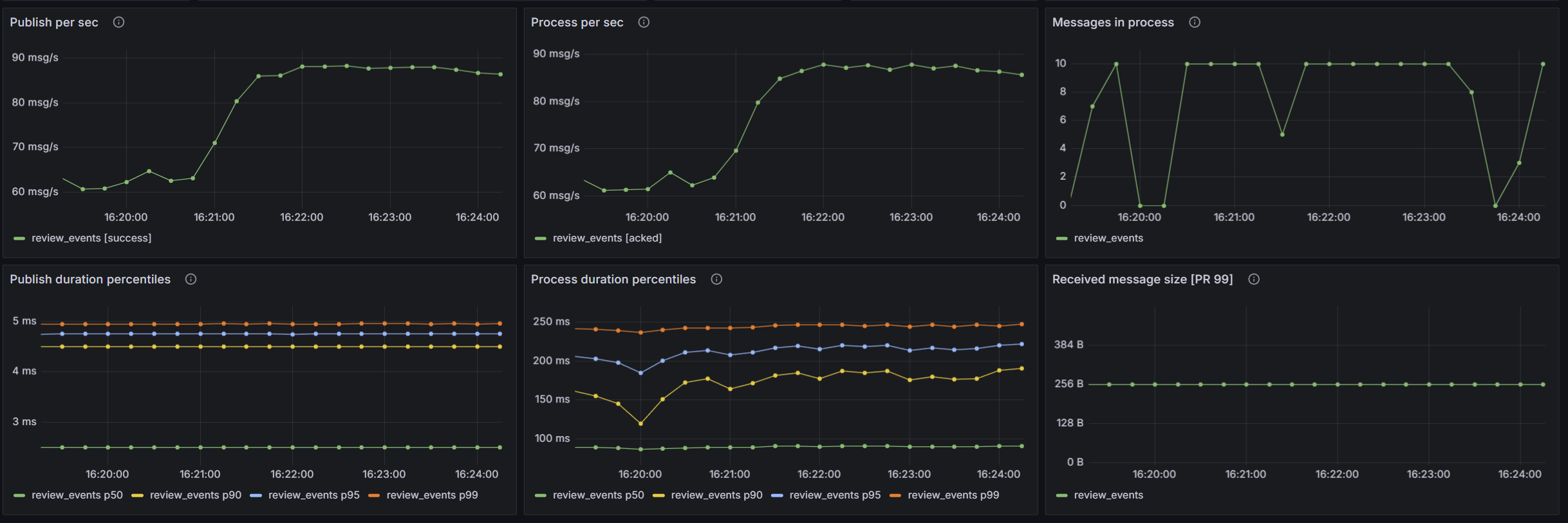
SQLBroker additionally provides metrics derived from the messages persisted in the database:
sqlbroker_messages— messages in the primary table, labeled byqueueandstate.sqlbroker_most_overdue_message_age_seconds— how long the most overdue message has been eligible for processing, labeled byqueueandstate.sqlbroker_archived_messages— messages in the archive table, labeled byqueueandstate.sqlbroker_state_collection_last_success_timestamp_seconds— Unix timestamp of the last successful database sample.

Standalone sampler#
If the sampler runs in every broker node, each node queries the shared database and reports database-wide values and exports a duplicate copy of the same series. Prefer one standalone sampler per database, using the packaged sqlbroker-state-metrics command:
pip install "faststream-sqlbroker[cli]"
sqlbroker-state-metrics \
    --host 0.0.0.0 \
    --port 8000 \
    --message-table message \
    --archive-table message_archive \
    --interval 30 \
    --database-url postgresql+asyncpg://user:pass@localhost/mydb # pragma: allowlist secret
In-broker sampler#
The sampler can also run as part of the broker. Install the Prometheus dependency and pass the registry exposed by your metrics endpoint to SqlBrokerStateMetricsConfig:
Mount metrics_app at /metrics in your ASGI application. These database-wide gauges must not be summed across instances. This applies even to nominally single-node deployments because rolling restarts can briefly run the old and new broker nodes at the same time.